
Table of Contents
Single page JavaScript applications have become ubiquitous on the modern web and have largely outplaced traditional websites and applications. In many regards, this is an improvement in user experience as features are loaded dynamically instead of full page reloads, and it provides more interactivity. However, there is an area in which SPAs fall short: security.
These applications are typically coupled with an API on the backend and rely on it for retrieving data and updating information. When working with user authentication, a token must be passed from the client to the server. As we will see, the complexity arises from the storage of the tokens and their transport.
In traditional browser applications, the login is maintained using a session cookie and the user information is stored on the server. The session cookie, an opaque and unique string, is sent with every request and allows the server to know who is calling since it's associated with login information on the backend. This is the best approach as cookies were designed for this very purpose, and avoid the pitfalls of handling them in JavaScript. So how can we use this browser feature and stateful sessions in our single page applications? The solution is to use a token proxy: middleware to convert sessions into access tokens.
Many frameworks offer variants that combine frontend and backend components such as React with Next.js or Vue with Nuxt, etc. These solutions can be used to implement a secure authentication system. However, they also pose other security constraints which are difficult to adhere to. This article is focused on the security of purely frontend frameworks, as they should be used (in my opinion), with no JavaScript on the backend or server side rendering.
In this example, I will describe how to implement a secure single page application with a token proxy using ASP.NET, including the security considerations and detailed explanations.
Motivation
When using OAuth 2 authorisation, you receive an access token and a refresh token to call your protected services. When paired with a Single Page Application, written in React, Angular, etc. you might be inclined to store these tokens on the client side. This is a bad practice for a few reasons in order of importance:
- When stored in
localStorageor in memory on the frontend, tokens can be read by browser extensions. Meaning that a malicious extension could retrieve the token and perform actions in place of the user. - In order to request a token from the authentication provider using OpenID Connect, it must be declared as a public client. Therefore, any third party can provision tokens and access the API without interacting with the frontend.
- Access tokens and refresh tokens are generally plain text (encoded in base 64) and may contain information that you don't want to disclose.
- Tokens cannot be revoked unlike sessions, a long life access token cannot be prevented from accessing the service until it expires. A user cannot be logged out, a token will remain valid until expiration. The only option is to discard the token.
- The authentication and refresh logic must be handled on the frontend, this can be messy and must be handled in a shared state.
Instead, you should store the login state in cookies using opaque tokens, inaccessible from JavaScript. So how can we keep our frontend secure and still rely on access tokens on the backend? Using a token proxy, we can use sessions for our logins and convert them into access tokens behind the scenes.
Proxy Overview
The principal of a token proxy is rather simple. Instead of calling our API directly, we send the request to the proxy that then forwards it to the API. The proxy has the following responsibilities:
- Request a login URL from the identity server using the client secret
- Handle the authentication callback, store the resulting tokens in dynamic storage (eg: Redis) and provide the user with a session token
- Authenticate incoming requests, retrieve the access token using the session token and forward the request to the backend.
- Check the origin of the requests and use cookies to prevent XSS (Cross Site Scripting)
- Provide the user with session information from the identity token
- Refresh the access token when it expires
- Handle a clean log out, clear the cookies and clear the session storage.
Here is an overview of the token proxy in relation to the other components:
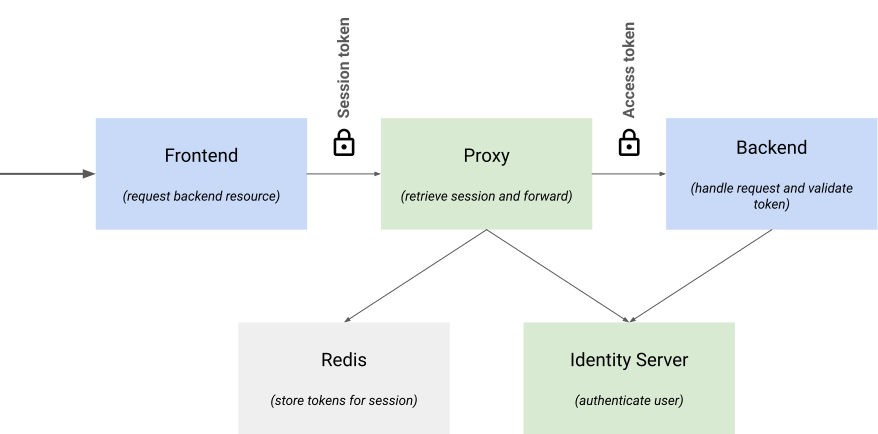
As shown by the diagram above, the proxy is responsible for authentication and storing the sessions. Access tokens are then forwarded to the API, and can be validated by retrieving the public key from the identity server.
OpenID Connect login flow
The proxy should use OpenID connect to request a login and subsequently request OAuth tokens from the identity server. Therefore, the proxy must be registered as a private client dedicated client ID and client secret.
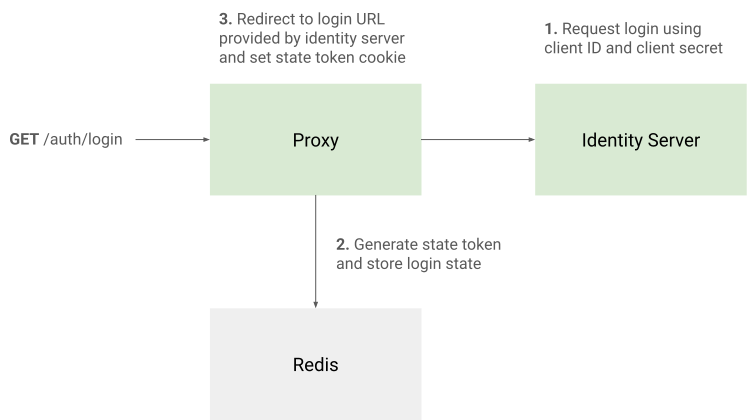
Step 1 : Request a login URL from the private client
Since the proxy is a private client, it's the only client that can request a login URL from the identity server. When this URL is requested, a state will be generated that must be provided in the next step of the login. In order to keep track of it, we must store it and provide the user with a state cookie that serves as a lookup key.
The state and cookie should have a short expiration time, as the login process should take a few minutes at most.
Step 2: Finish login and retrieve tokens
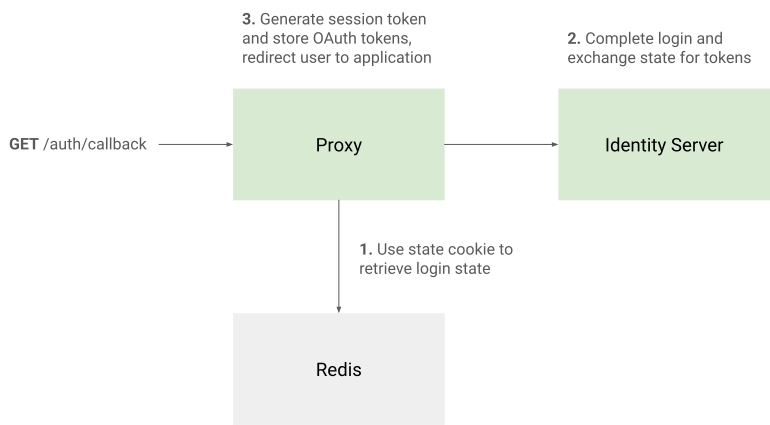
Once the user has logged in through the identity server, they will be redirected to the callback endpoint. From here, the state can be retrieved from storage and used to request tokens. The tokens can then be stored, and a session cookie provided to the user. The user can then be redirected to the application.
Step 3: Retrieve session information
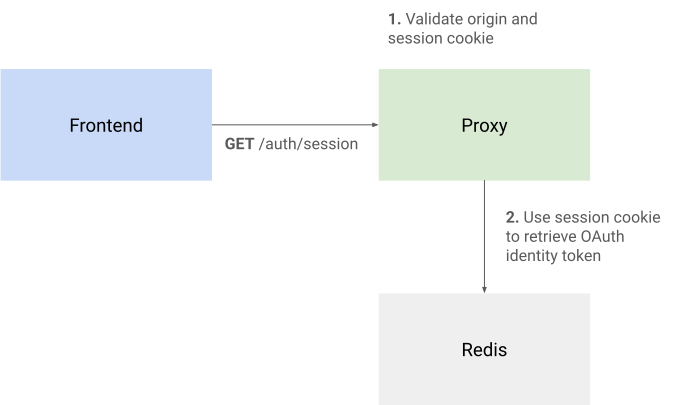
Once in the application, the user may retrieve session information through the session endpoint. In this example, the proxy performs a lookup of the session and retrieves the identity token from storage.
Considerations
A token proxy must adhere to certain principals to be effective and secure. Here are the main constraints that must be respected:
Validating the origin of the request
Forcing CORS on all requests
CORS allows browsers to determine if requests are allowed from any given origin. This works by performing a "preflight" before requests (OPTIONS) that returns the following headers: Access-Control-Allow-Origin, Access-Control-Allow-Methods, Access-Control-Allow-Headers, etc. This effectively prevents requests from being made from a third-party or malicious site.
The CORS specification differentiates "Simple" requests, where a preflight is not required and "Preflighted" requests. Simple requests include all GET requests and some POST requests. This works on the assumption that these requests don't mutate state on the backend, which may or may not be the case. In order to protect all endpoints and require a preflight for all requests, a custom header must be provided such as X-Use-Proxy: true for instance.
CSRF token validation
In addition to providing CORS headers to the client, the proxy should also verify provide and verify a CSRF token sent on login. You might ask, well if we have CORS enabled, why do we need a CSRF token? Well, the problem is that CORS is a client side check whereas a CSRF token is a server side check. You can't be certain that every request will respect the CORS policy so, an additional layer of protection is required.
The application should request the session of the user upon login, this endpoint should then set a CSRF token cookie. When making requests to the backend, the client should provide the token in a header such as X-Csrf-Token. Before forwarding any request to the backend, the proxy should check that the cookie and header values match.
Making sure that the cookie is scoped to the domain ensures that the origin is valid since JavaScript in other places can't access it and send it to the backend. The CSRF cookie should use the following attributes:
| Attribute | Value | Description |
|---|---|---|
SameSite |
Strict |
Only send the cookie for requests on this domain |
Secure |
true |
Ensure that the cookie is only sent over HTTPS |
Domain |
Your domain | The root domain from which to scope the cookie |
HttpOnly |
Unset | The cookie must be accessible from JavaScript so, this must be omitted |
Angular HTTP client interceptor
Here's an example of an Angular HTTP client interceptor that sends both the CORS forcing header and CSRF header to the proxy. There are no tokens to handle on the frontend, the session cookie is sent automatically since it's bound to the domain.
import { HttpInterceptorFn } from "@angular/common/http";

export const proxyInterceptor: HttpInterceptorFn = (req, next) => {
    let headers = req.headers.append("X-Use-Proxy", "true");

    const cookies: { [key: string]: string } = Object.fromEntries(
        document.cookie.split(";").map((c) => c.trim().split("=", 2)),
    );

    if ("csrf-token" in cookies) {
        headers = headers.append("X-Csrf-Token", cookies["csrf-token"]);
    }

    return next(
        req.clone({
            headers: headers,
            withCredentials: true, // Ensure that cookies are sent with the request
        }),
    );
};
It could be argued that the X-Use-Proxy is not necessary in this instance, since the CORS preflight forcing is provided by the CSRF token. However, you may not need a CSRF token for every request.
Streaming the request and the response to and from the API
Since the proxy sits between the client and the backend, it would be inefficient to load the backend response into memory before forwarding it to the client. The proxy should stream the request and response bodies from the backend.
Creating a session token and providing it to the client
When generating tokens for sessions, you should use a cryptographically secure random function. Such as the RandomNumberGenerator.GetHexString() generator in System.Security.Cryptography.
Like the CSRF token cookie, there are some important attributes to use when setting the cookie. However, here we purposefully set the HttpOnly attribute to true, preventing it from being read with JavaScript:
| Attribute | Value | Description |
|---|---|---|
SameSite |
Strict |
Only send the cookie for requests on this domain |
Secure |
true |
Ensure that the cookie is only sent over HTTPS |
Domain |
Your domain | The root domain from which to scope the cookie |
HttpOnly |
true |
The cookie must NOT be accessible from JavaScript |
Encrypting the tokens at rest
Since the proxy stores the access tokens for each session, it's best practice to encrypt this data at rest. The key should be stored elsewhere. If the session storage were to be compromised, the tokens would be unusable without the encryption key.
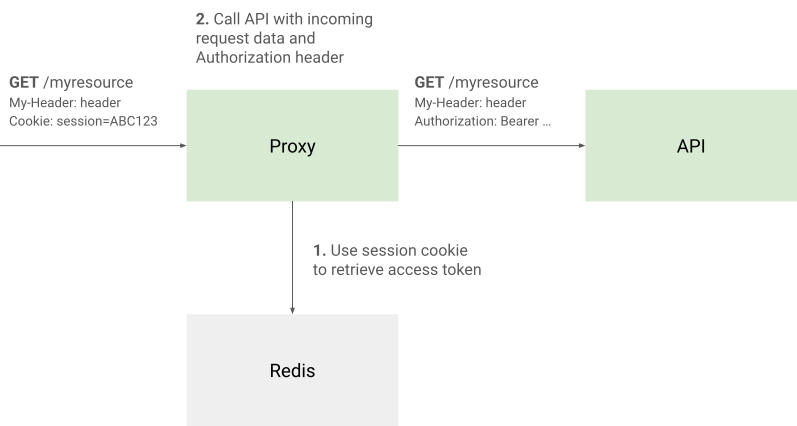
Forwarding requests to the API
In order to forward requests to the backend, the proxy should register a "catch-all" route. Here, the session should be validated, the incoming request streamed to the backend and, the response streamed to the client.
Frontend
Checking the session and requesting a login
In order to check that the user is logged in, the frontend should attempt to read the current session from the proxy. If there is an HTTP 401 error (Unauthorised) for instance, the user should be redirected to the login page.
Using Angular for example, an interceptor can simply check that any HTTP request results in a login error, and redirect to the login endpoint on the token proxy:
export const loginInterceptor: HttpInterceptorFn = (req, next) => {
    return next(req).pipe(
        catchError((error: HttpErrorResponse) => {
            if (error.status === 401) {
                window.location.href = environment.PROXY_URL + "/auth/login";
            }

            return throwError(() => error);
        }),
    );
};
To retrieve information about the session, an endpoint should provide information about the session and the user from the OpenID identity token.
Calling the API through the proxy
In order to request a backend resource, the frontend can simply perform an HTTP request. The session cookie will be sent and will allow the proxy to authenticate the user.
Since the proxy provides a catch-all controller for forwarding requests, any new backend endpoint doesn't need to be registered prior. All calls can simply use the same method and path, only the host changes.
Backend
Validating access tokens with the identity server
The proxy validates session tokens and forwards the request to the backend, providing the user's token. Therefore, the backend must validate tokens with the identity server.
In OAuth 2, the access token is a JWT (Json Web Token), it has a cryptographic signature that can be used to determine the authenticity. Many identity server implementations, provide a /.well-known/openid-configuration endpoint to retrieve the public key used to sign tokens through a JWKS (Json Web Key Set). This can be used by the backend to ensure that tokens were generated by the identity server.
ASP.NET applications can use the Microsoft.AspNetCore.Authentication.JwtBearer package to validate access tokens using the typical Authorize controller attribute. Simply add the following service registration in the Startup class:
services.AddAuthentication(JwtBearerDefaults.AuthenticationScheme)
    .AddJwtBearer("Bearer", options =>
    {
        options.MetadataAddress = "https://myidentityserver/.well-known/openid-configuration";
        options.RequireHttpsMetadata = true;
        options.MapInboundClaims = false;
        options.TokenValidationParameters = new TokenValidationParameters
        {
            ValidIssuer = "https://myidentityserver",
            ValidAudience = "mybackend",
            NameClaimType = "sub"
        };
    });
You will also need to enable authentication and authorisation when creating the app instance:
app.UseAuthentication();
app.UseAuthorization();
Example code
On GitHub, I provide a fully featured, documented and, optimised example of a token proxy server in ASP.NET. You are free to use the code in your own projects. The main takeaways of this solution can however be applied to any other language or framework.
Conclusion
In fact, securing single page applications is quite difficult. There are many factors to take into account when mitigating the most common web vulnerabilities. Most example code on the web makes no mention of this, but instead focuses on small parts of an application rather than a thorough explanation of security concerns.
For many projects, it could be argued that the risk is low. However, this post demonstrates that there is a straightforward solution to proving a modern yet secure application.